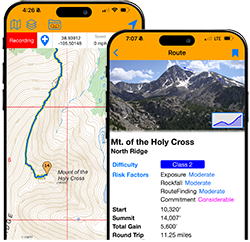


I want to pull back the curtain a bit on a feature decision I made last year. When I discontinued the old "Map Drawing" tool in 2025, it was because I wasn't seeing many people using it. Maintaining older code takes a lot of effort, so it seemed logical to retire it.
However, after it was gone, I realized I made the wrong call. I actually found myself missing the tool for my own planning. More importantly, I realized that providing a free, built-in space for map drawing/planning is something that should be available here. I want our members to have these tools right here on the site, rather than having to search elsewhere for this functionality or pay for a subscription through another service. To be clear, the goal isn't to try and compete with major web mapping products or premium navigation apps out there. Many of us will still use tools like CalTopo for advanced mapping stuff. Instead, this is about filling in gaps on 14ers.com so we can have useful mapping tools right here on the site. And have access to the map work through your Dashboard.
So, I changed my mind. Over the past month, I completely rebuilt the tool from scratch. I didn't just want to bring back the old version—I wanted to build a robust, more modern interface that will be easy to maintain and expand in the future.
It's now called My Map Workspace, and it's live on the main map today. Click the button on the left side of the map to display the workspace panel. If you don't see the icon, you need to log into your account first. Once you can see the panel, here's what it contains:
- Import GPX: Bring in existing GPX data for further manipulation or just to have it in your workspace.
- Drawing: Freely sketch out tracks and plot waypoints directly on the map interface. For tracks, you can also view an elevation profile AND use modify, trim, and smooth tools.
- Folders: Organize your tracks and waypoints into dedicated folders.
- Search Function
- Export: Folders or individual tracks/waypoints can be exported to GPX or KML.
- Workspace Settings: Set defaults for editing and how work is displayed on the map.
- My Stuff: Content in your map workspace is automatically saved to your 14ers.com profile. And you can jump directly to the workspace panel from My Stuff, in My Dashboard.
I welcome your feedback on the changes and hope it helps some of you better plan hikes and climbs.
Thanks for reading,
-- Bill
One more note: In various places throughout the site, I will be adding "Open in My Map Workspace..." options. This should be helpful if you're viewing a trip report gpx-based map and would like to make it your own, or if you found a GPX Library entry you want to work with.